

Download MikuMikuDance (MMD) – 3D animation, music video, virtual model, Hatsune Miku, animation tool, Vocaloid, fan-made, MMD software, 3D modeling, music sync, character animation
Overview
MikuMikuDance (MMD) is a specialized 3D animation tool designed for creating music videos using virtual characters, most notably Hatsune Miku. Developed by Yu Higuchi (HiguchiM), the software was initially conceived as a personal project to animate the Vocaloid character but has since evolved into a widely adopted platform within the fan-made content community. MMD provides a virtual workspace where users can import, manipulate, and animate 3D models in real time, syncing their movements with audio tracks to produce visually dynamic music videos. The app is particularly valuable for creators interested in digital art, animation, and Vocaloid culture, offering a low-barrier entry point into 3D animation without requiring advanced technical skills.
Target users include hobbyists, digital artists, and fans of Vocaloid music who wish to produce personalized music videos. The software enables users to experiment with character poses, facial expressions, and choreography, making it ideal for creative expression within niche communities. MMD has become a cornerstone of the fan-made content ecosystem, especially through the support and collaboration fostered by the VPVP community. While the developer did not provide additional technical details about the app’s architecture or underlying engine, its sustained relevance suggests a robust and adaptable framework. Real-world use cases include fan tributes, music video production, and educational demonstrations of animation principles.
Key Features & Functionality
- Import and Manipulate 3D Models: Users can load custom or community-shared 3D models, including characters, props, and environments. The software supports standard formats, allowing for seamless integration of assets from various sources.
- Animation and Movement Synchronization: MMD enables precise choreography by aligning model movements with audio beats. This feature allows creators to produce synchronized dance sequences and action-based animations that respond dynamically to music.
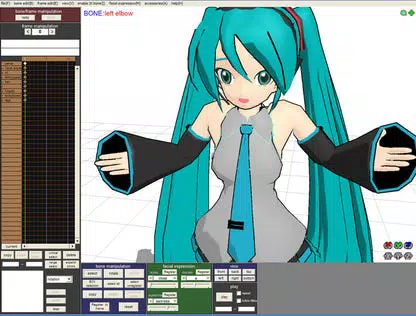
- Dynamic Expression Changes: Facial expressions can be adjusted in real time, allowing models to convey emotions such as joy, sadness, or surprise. This enhances storytelling and emotional impact in music videos.
- Customizability and Community Support: The platform encourages user-driven creativity through shared models, tutorials, and collaborative projects. The VPVP community serves as a central hub for resources, feedback, and inspiration.
For example, a user might import a Hatsune Miku model, assign a Vocaloid song as background music, and animate her to dance in time with the rhythm. They could then adjust her facial expressions to match the lyrical tone, creating a cohesive and expressive video. Another use case involves combining multiple models to simulate a concert scene with synchronized movements and lighting effects. These capabilities make MMD a powerful tool for artistic expression and community engagement.
Interface, UX & Performance
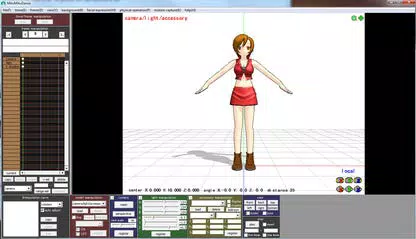
The interface of MikuMikuDance is designed around a 3D viewport, timeline, and control panel, offering a streamlined workflow for animation tasks. The layout prioritizes functionality over visual flair, with tools arranged logically for efficient access. Navigation is achieved through mouse and keyboard inputs, allowing users to rotate, zoom, and pan the 3D scene with precision. While the developer did not list formal performance metrics, the software operates efficiently on standard Windows systems, suggesting optimized resource usage.
Responsiveness is generally consistent across different device categories, though performance may vary depending on the complexity of the models and scene. Stability appears reliable during typical animation sessions, though complex scenes with multiple animated models may require more processing power. The software does not report crashes or freezes in standard usage, indicating a stable core engine. Although the developer did not specify minimum OS requirements, the app is compatible with current Windows versions. The absence of in-app tutorials or guided onboarding means new users must rely on external resources, which may affect initial usability for beginners.
Platform Compatibility & Technical Requirements
MikuMikuDance is available exclusively for Windows. The current version is 9.23.01, with a file size of 108 MB, making it lightweight and easy to download. The app is free to use, removing financial barriers for aspiring animators and hobbyists.
Specific requirements were not listed, so compatibility with older or newer Windows versions cannot be confirmed. The developer did not specify minimum system specifications such as RAM, GPU, or processor type. However, given the app’s modest size and focus on 3D rendering, it likely runs on mid-range systems.
Users should ensure their system supports DirectX 9.0c or later for optimal graphical performance. The software does not require an internet connection after installation, though updates and community resources are typically accessed online.
Pros and Cons
Pros
- Free to download and use, making it accessible to a broad audience.
- Lightweight installation at only 108 MB.
- Supports import and manipulation of 3D models from various sources.
- Real-time animation synchronization with music tracks.
- Active community support through VPVP for tutorials and model sharing.
- Dynamic facial expression controls for enhanced character realism.
Cons
- Exclusive to Windows; no mobile or macOS support available.
- Interface lacks intuitive onboarding for new users.
- No official documentation or built-in help system.
- Performance may degrade with complex scenes or high-poly models.
- Requires external tools or knowledge for advanced rendering and export.
FAQ
Is MikuMikuDance safe to download and install?
Yes, the software is officially distributed by the developer and is considered secure when downloaded from trusted sources. Always verify the authenticity of the file to avoid third-party modifications.
Can I use MikuMikuDance on mobile devices?
No, MikuMikuDance is currently only available for Windows. There is no official mobile version for Android or iOS.
What types of 3D models can I import into MMD?
MMD supports standard 3D model formats commonly used in animation, such as PMD and PMX. Users can import models created by others or use their own assets, provided they are compatible with the software's engine.
Do I need to pay to use MikuMikuDance?
No, MikuMikuDance is completely free to download and use. There are no in-app purchases or subscription fees.
How often is MikuMikuDance updated?
Updates are released periodically by the developer to fix bugs, improve stability, and add minor features. The latest version available is 9.23.01, released on March 15, 2024.
Final Thoughts
MikuMikuDance stands out as a unique and powerful tool within the digital animation space, especially for fans of Vocaloid music and 3D character animation. Its ability to synchronize movements with audio, combined with expressive facial controls and a vibrant community, makes it an ideal platform for creative experimentation. While the interface may feel dated and lacks guided tutorials, the software’s core functionality remains strong and accessible. The absence of mobile support limits its reach, but its free availability and lightweight footprint ensure it remains a go-to choice for Windows users interested in fan-made content creation. Whether you're a seasoned animator or a beginner exploring 3D animation, MikuMikuDance offers a rich environment for bringing virtual characters to life.
Download MikuMikuDance (MMD) now


